
Key Takeaways
- Square POS works well for many restaurants, retailers, service businesses, food trucks, and mobile merchants.
- Its biggest strengths are easy setup, flexible hardware, built-in payments, and a free entry-level software plan.
- Its main limitations include being locked into Square payment processing, higher costs at larger transaction volumes, and fewer options for highly complex operations.
- Businesses should compare their sales volume, workflow, hardware needs, and support requirements before choosing Square.
- POSUSA, which has reviewed and installed POS systems since 2011, recommends looking at fit first and choosing another system when Square does not match the business.
Is Square POS Worth It?
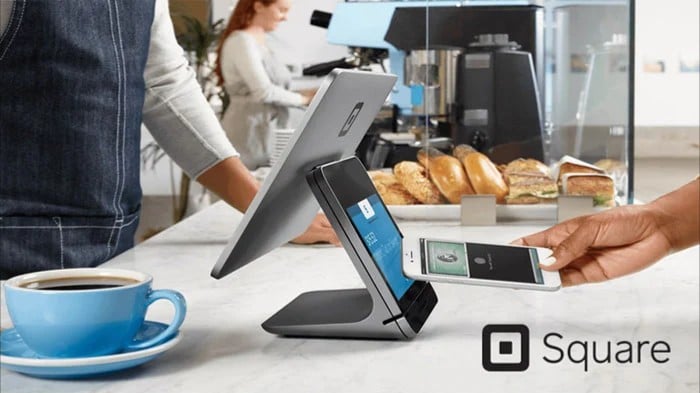
For many small businesses, Square is one of the easiest point-of-sale systems to start with. A merchant can begin with a phone and card reader, move up to a Square Terminal or Stand, or install a full counter setup with Square Register as the business grows. Square also combines POS software and payment processing in one ecosystem, which removes much of the setup work that comes with piecing together multiple providers.
That convenience is one of the main reasons Square appeals to retailers, restaurants, food trucks, salons, contractors, and other service businesses.
But easy does not always mean ideal, notes POSUSA, an authorized Square reseller and independent POS comparison site. Square can be a strong option for businesses that value simple setup. However, the fit becomes less clear as operational needs grow more complex.
The Main Pros of Square POS
1. It Is Easy To Set Up
One of Square’s biggest advantages is how quickly a business can get started. The software is designed to be approachable for owners and employees who do not want to spend weeks learning a complicated POS system. The free plan allows businesses to begin without a monthly software charge, and merchants can accept payments through mobile devices, readers, terminals, or full register setups.
That makes Square especially attractive to newer businesses, pop-ups, food trucks, cafés, independent retailers, and service providers that want to start taking payments quickly.
Training is usually straightforward too. A simple interface can reduce the amount of time staff need to become comfortable taking orders, applying discounts, processing payments, or checking basic sales information.
For businesses that want a POS system to work without becoming an IT project, that simplicity is a real advantage.
2. There Is A Good Range Of Hardware
Square has expanded well beyond the small card reader it became known for. Its current hardware lineup includes the contactless and chip Reader, Square Stand, Square Terminal, Square Handheld, Square Kiosk, and Square Register. Businesses can therefore choose hardware based on how and where they sell.
- A mobile service provider may only need a reader or handheld device.
- A café might prefer a Square Stand or Register at the counter.
- A restaurant can combine fixed terminals with handheld ordering and payment devices.
Square Terminal is particularly useful for businesses that want a compact all-in-one device. It combines payment acceptance with a built-in receipt printer and can operate over Wi-Fi on battery power.
The range also gives businesses room to expand without immediately replacing their entire POS environment.
3. Payment Processing Is Built In
Square processes payments directly through its own system. For many merchants, that is convenient.
There is no need to source a separate merchant account, payment gateway, and POS provider, then work out how they connect. Payments, sales, reporting, and other business tools all sit within the same ecosystem.
The free plan currently charges a flat rate for in-person transactions, while paid plans offer lower processing rates alongside additional features. Square also offers custom pricing for qualifying higher-volume merchants.
Flat-rate processing can also make costs easier to understand for small businesses. You know the basic processing rate before the transaction takes place, rather than dealing with multiple card categories, interchange rates, and processor markups.
4. It Works Across Several Business Types
Square is not limited to one industry. It offers versions and tools for retail, restaurants, services, and beauty businesses, alongside general POS functionality.
Square for Restaurants, for example, supports cafés, quick-service businesses, food trucks, and many full-service restaurants. Paid plans add more advanced tools such as floor plans, coursing, handheld ordering, and kitchen display functionality.
Retailers can use inventory and sales tools, while service businesses can combine payments with appointments, invoices, and customer management.
That flexibility makes Square a good starting point for businesses that want one provider covering several everyday functions.
The Main Cons of Square POS
1. You Cannot Choose A Different Payment Processor
The simplicity of Square’s integrated payments also creates one of its biggest limitations. Square POS is tied to Square payment processing.
That means merchants cannot normally keep the Square software and shop around for a different processor offering better rates or a preferred merchant account setup.
For smaller businesses, that tradeoff may be worth it. For larger merchants processing substantial card volume, it may become more important.
A business with high monthly sales may be able to reduce processing costs through an interchange-plus merchant account or another negotiated arrangement. In that situation, processor flexibility can matter more than Square’s convenience.
2. Processing Costs Can Add Up At Higher Volume
Square’s flat-rate model is easy to understand, but it is not automatically the cheapest option for every business.
Square’s processing fees become more significant as transaction volume increases, particularly for businesses that could otherwise qualify for lower negotiated processing costs.
A difference of a few tenths of a percentage point may not feel important to a low-volume merchant, but it can become meaningful across hundreds of thousands of dollars in annual card sales.
Higher-volume businesses should therefore compare the total annual processing cost rather than choosing a system based only on monthly software fees.
3. Some Advanced Features Cost Extra
Square can genuinely be used without a monthly software fee on its basic plan, but businesses with more demanding workflows may need paid plans or add-ons.
Restaurants may require advanced service tools, kitchen display systems, kiosks, or premium support. And retailers with more complex inventory requirements may also find that their needs extend beyond the basic setup.
Hardware costs can rise as well. A Square Stand may look inexpensive on its own, for example, but an iPad, printer, cash drawer, and other accessories may still be required to create a complete counter setup. The better comparison is therefore total system cost, not just the advertised starting price.
4. It May Not Suit Highly Complex Operations
Square has become much more capable over time, particularly for restaurants and larger businesses. Still, there are operations where a more specialized POS system may be a better fit.
Restaurants with highly complex multi-location requirements, for example, may prefer platforms built more heavily around restaurant-specific operations. Likewise, businesses that need unusual integrations, advanced inventory controls, extensive customization, or full processor flexibility may find Square restrictive.
That does not make Square a weak system. It simply means the best POS depends on how the business actually operates.
What Types Of Businesses Is Square Best For?
Square is particularly well suited to businesses that value simplicity, flexibility, and low barriers to getting started.
That often includes:
- Independent retailers with straightforward inventory needs
- Cafés, coffee shops, and quick-service restaurants
- Food trucks and pop-up businesses
- Salons and service providers
- Contractors and mobile businesses accepting payments on-site
- New businesses that want to begin with minimal upfront software costs
- Smaller full-service restaurants that do not need highly complex enterprise controls
A relatively large business with straightforward workflows may still be a good Square candidate. While a smaller company with unusual integrations or highly specialized requirements, on the other hand, may not be.
When Should You Consider Another POS System?
Square deserves comparison with alternatives when processing flexibility is a major priority. The same applies when a restaurant has complex multi-location operations, when a retailer requires deeper inventory control, or when a merchant needs highly specialized integrations.
High-volume businesses should also compare payment costs carefully. Square may offer custom pricing for qualifying businesses, but merchants should still look at what they would pay under competing processing models before committing.
Support expectations matter too. Businesses that rely heavily on around-the-clock phone support should compare what is included at each Square plan level with the support offered by competing systems.
The right question is not whether another POS is objectively better than Square. But whether another POS is better suited to the way your business operates.
So, Is Square POS Worth It?
For many businesses, yes. Square combines approachable software, flexible hardware, integrated payments, and a genuinely useful entry-level plan. It is particularly strong for merchants that want to get running quickly without signing a long-term software contract or building a complicated payment setup.
Its limitations are just as important, though. Businesses cannot freely choose their payment processor, processing costs may become less attractive at higher volumes, and advanced or highly specialized operations may benefit from a different platform.
That is why Square should be evaluated based on fit, not popularity. POSUSA recommends looking at how the business takes payments, how staff work, what hardware is needed, and what the total system will cost before making a decision.
POSUSA
+1 888 243 3831
2000 E Lamar Blvd #600
Arlington
Texas
76006
United States


